Created: 2026-06-14Updated: 2026-06-14
Blog Redesign 4 and an AI-First Design System

This is the fourth rebuild of this blog. This entire site exists as much for me to have something I care about to work on as it does to actually do blog stuff.
The history of this site is kind of neat:
- v1: Started out as a pure github pages theme and some markdown
- v2: Rewrote into a pelican theme I forked from someone and slightly modified
- v3: Replaced Pelican and its theme with React, MUI and NextJs
- v4: Basically v3 with a new custom front-end
The v3 React rewrite used MUI purely because work used it too and I'd been just slinging my own css and using bootstrap.js in Angular before that. I'd read the developer docs and coded it by hand. It took a while, but it was pretty fun. In the v3 design I had no opinions around design system use. I still didn't really need one in v4 but decided to build it out anyways, again, for fun.
I spent most of my time in this rebuild selecting the libraries, tools, frameworks, that sort of thing. I didn't care to actually learn the framework code: That feels low-leverage these days. I can honestly say that for better or worse, I didn't write a single line of the code. I did read some of the code, but mostly just to learn the frameworks better.
The new blog front-end architecture
My goals were pretty straightforward:
- Learn something new
- Make sure it works AI-first, human way out of the loop
- Looks good and makes me happy
The tools I landed on for this are kind of interesting.
Server-Side Rendering: Next.js 15
I don't pay for a server to host this site. There's no dynamic content. Every time I add a new post to it, I re-render the whole thing from markdown as static files and upload them to a google storage bucket. The site content is served just as a bunch of static assets from there.
It's dirt cheap and how it always worked. I didn't materially change this, I'm just calling it out because I think it's really cool. While blost costs me like $2/month.
Styling: Tailwind v4
Tailwind has become the leader in CSS frameworks, overtaking bootstrap. AI works great with popular tools and when I researched how to make a modern best-in-class design system, it felt like a good fit.
Given how small the blog app realistically is, I'm able to get the design tokens
into a single tokens.css file. Pretty manageable.
The Tailwind themes feature also seemed worth using. All the new sites seem to support dark mode, presumably for a11y, so I wanted that too.
Component structure: shadcn-style on Radix primitives
I really like how modern web dev chunks things into components, but everyone rips on MUI as being too same-y. I wanted something more modern, and something that might usually have more ownership overhead but that AI mitigates.
AI can sling out component code on its own, so I really just want to be consistent. Went with shadcn-style on Radix primitives for the components. They both seem to have good adoption and when I reviewed how the style things it sat well with me.
- shadcn: components ship as source copied into the repo, owned and edited directly, following a consistent convention for variants, class-merging, and config.
- Radix: primitives that supply the interaction and a11y, focus management, keyboard navigation, ARIA roles, that kind of thing.
Workshop: Storybook 10
Every component builds and renders in isolation, off the live site. The agent can stand one up and check it without touching a page.
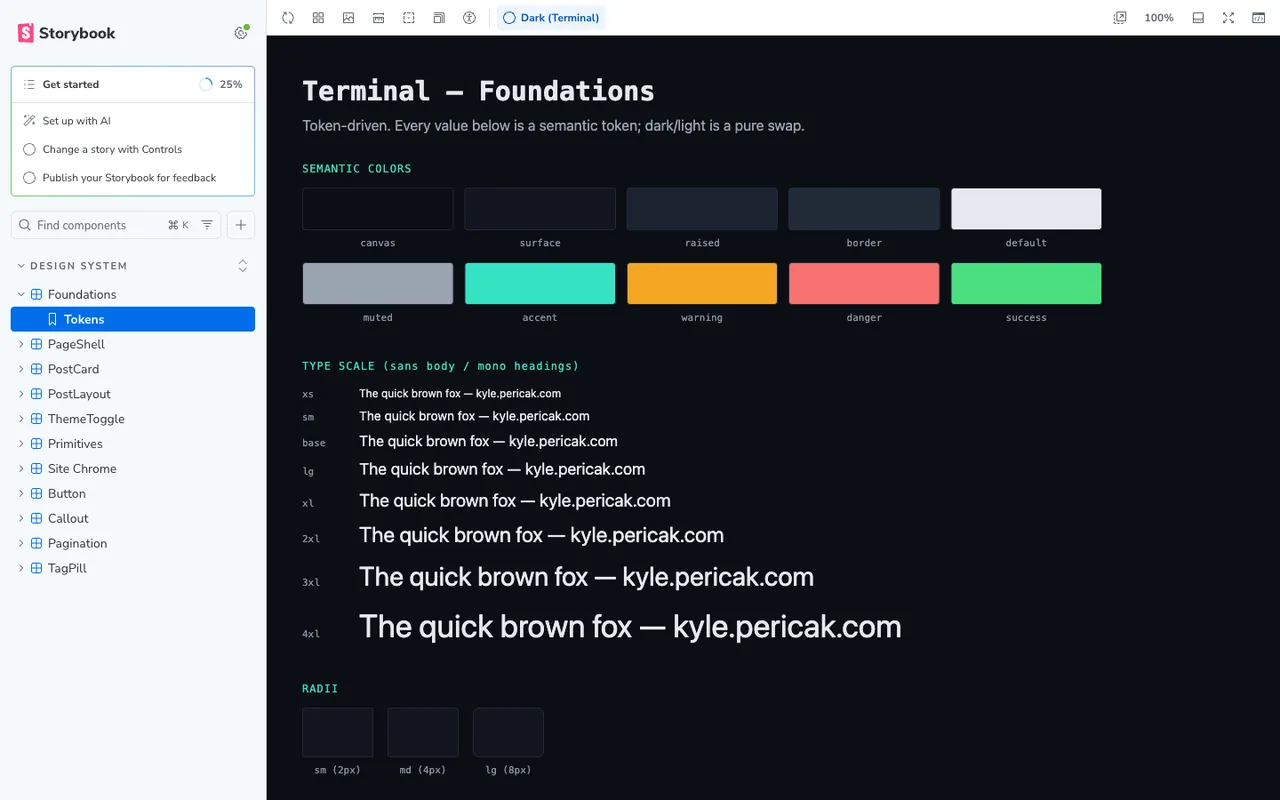
The whole workshop ships with the site now. Poke around it at /storybook/.
Content: markdown to static HTML
Posts stay plain markdown files in git with front-matter metadata, rendered with Prism for code and Mermaid for diagrams. No change here, I just think it's neat.
The development flow
After the initial claude conversations and deep research report, I leveraged my PRD writing and Design Doc writing claude skills to better scope the work. I really didn't need to do much on my own. It asks clarifying questions then just kind of goes for it. Works well. I share these in a Marketplace Plugin here.
Once the work is scoped, it ends up being chunked out into tasks that Claude is really good at stepping through and verifying one at a time.
I set up the backpressure mechanisms ahead of time. Playwright MCP is the biggest one, and I had a solid test suite to get started. I recently read this article Backpressure is all you need that illustrates the approach well. You can work with Claude to set this up, don't do it by hand. It's good at building its own guard-rails.
Next, I clean up my context and get my goal command.
Your context is getting full. Write me a /context prompt, less than 2000 chars, that will
clean up our work so far and leave us with what we need to know to execute on the plan.

Also provide a /goal command, less than 4000 chars, that I will paste back after
compaction. The goal should finish with a PR open and PW MCP rendering the changes. You
should have validated everything you can and be ready to ship pending my review.
That took it all the way from my old site to my new site. Night and day difference. It took maybe 2 or 3 hours of claude cooking. I just use the auto mode classifier on my Max plan, Opus 4.8 for this one, and walked away to hang out with my kids.
It wasn't perfect when it was done, but it was way further along than I'd have figured it'd get. I clicked about, asked for some cosmetic changes, and then really spent the rest of my time just getting it to teach me about what it did so I wasn't owning code I didn't understand.
AI-First Design
The experience of modifying the design was surreal. Entirely conversational. It built the components, I talked to it, it changed them. I wanted some spacing, alignment, borders, whatever - and I got them. This was a bit different from my usual flow in that it wasn't just changing the code in the page I was poking, but it was operating like it would in a more production style environment.
I'm pretty confident that this would work nicely with bigger teams and Design staff support.
QA remains critical
I see this all the time at work, too. AI churns out code at lightning pace, but it still lands on humans for taste and UX. It also misses a lot of unhappy path scenarios.
Once it was done coding, I spent probably the majority of my actual at-laptop interaction time just going through what it had built and tightening up the experience. Small UI bugs, janky flows, weird alignment, that kind of thing.
As AI coding continues to evolve, this is an area I'm researching and watching closely: Code QA processes are definitely changing and so far there's absolutely a big learning curve.
Given how simple this blog site realistically is, I was surprised how much manual review it needed.